Sizes of one piece, with Advanced one click away
Each product row captures name, unit, length, width, height, weight each, unit, quantity, delivery stop, and a quick stacking toggle. Click Advanced next to any row to open its full handling rules.
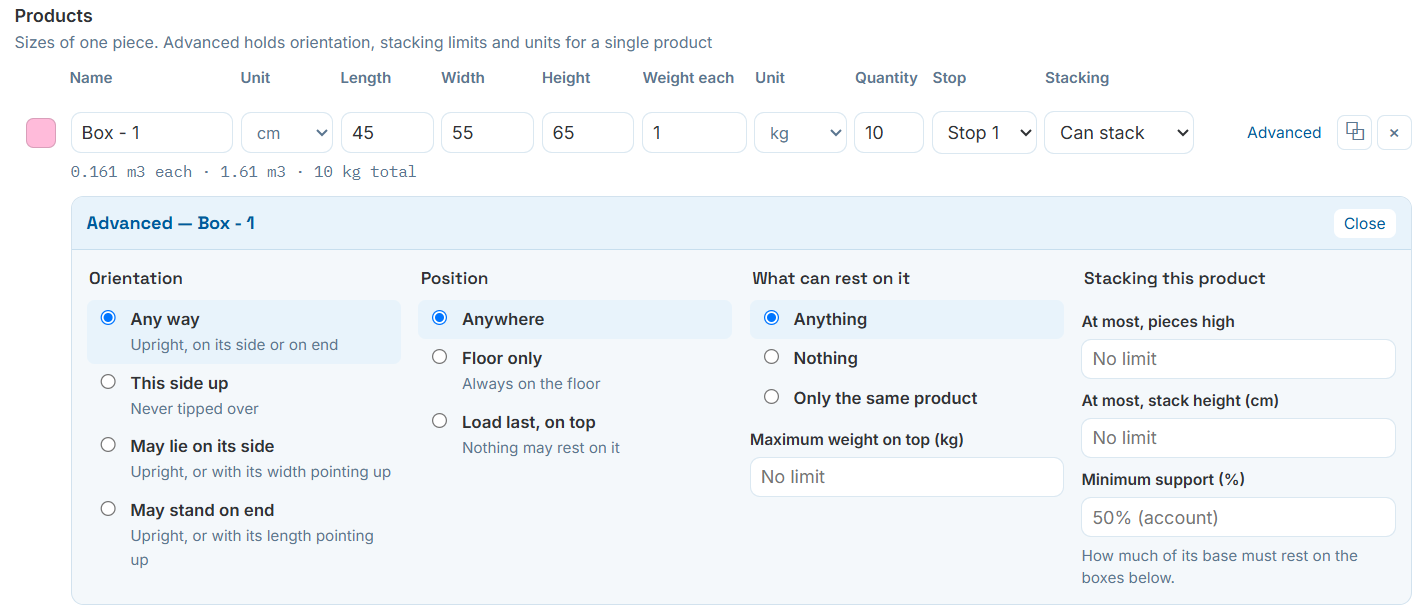
A product row, with its Advanced panel open.
How the product may be turned during placement
Restrict or allow specific rotations so the engine respects real handling rules instead of tipping a product onto whichever face happens to fit best.
Any way
Upright, on its side, or on end — the engine picks whatever fits best.
This side up
Never tipped over. For anything marked fragile-side-up or with a liquid fill.
May lie on its side
Upright, or with its width pointing up.
May stand on end
Upright, or with its length pointing up.
Where in the load the product may sit
Independent of orientation, position rules constrain where in the container a product is allowed to land.
Anywhere
No restriction — the default for most cargo.
Floor only
Always on the floor. For anything too heavy or unstable to stack under.
Load last, on top
Nothing may rest on it. For crush-sensitive or last-off-the-truck items.
Protecting what's underneath
Controls what the engine is allowed to place on top of this product, plus an optional weight cap.
- Anything — no restriction on what stacks above.
- Nothing — keeps the top completely clear, same effect as "load last, on top" from the other side.
- Only the same product — useful for uniform pallet stacks that shouldn't be mixed.
- Maximum weight on top (kg) caps the load regardless of which of the above is chosen.
Per-SKU limits that override the account default
"At most, pieces high" and "at most, stack height" cap a single product's own stack independently of everything else in the load. Minimum support percentage — how much of its base must rest on the boxes below — overrides the account-wide default from Calculation Defaults for this product only.