Activate Your Trial
Start your trial of the Cargo Load Planner API by contacting us. Please provide your username, email, and company name. Once we receive your information, we'll send an email with your login password to the address you provided.
Link: Contact Us
Generate Your API Key
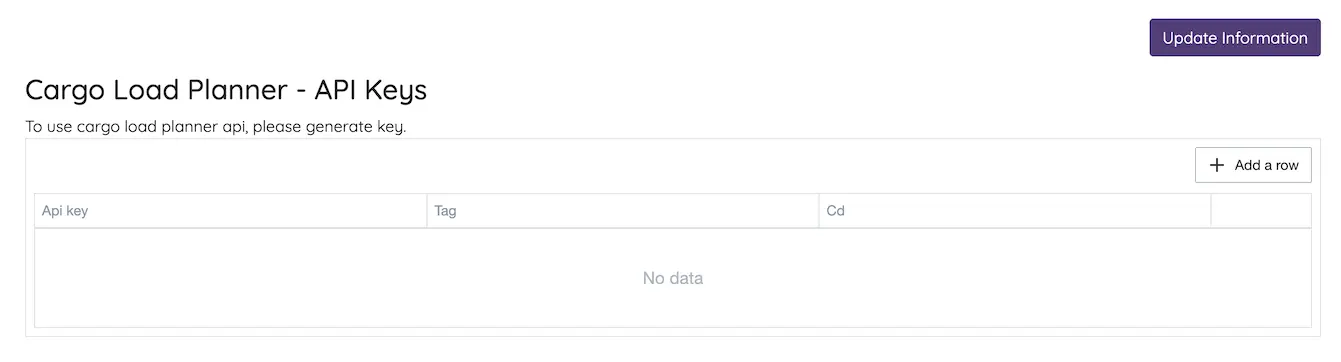
To generate an API key, first log in to Cargo Load Planner.
Go to your user profile: User Profile
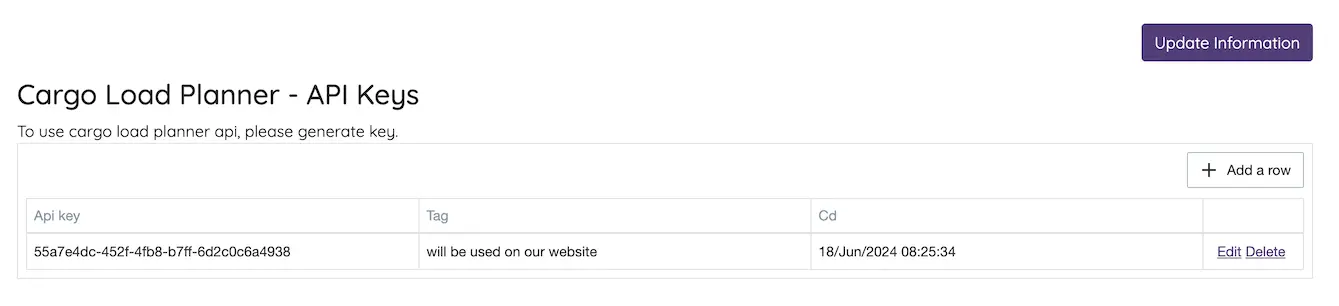
Check the section labeled "Cargo Load Planner - API Keys" and use the + Add Row button to generate a new key.
Once the key has been generated, you can copy it for further use.
Download the Demo Program
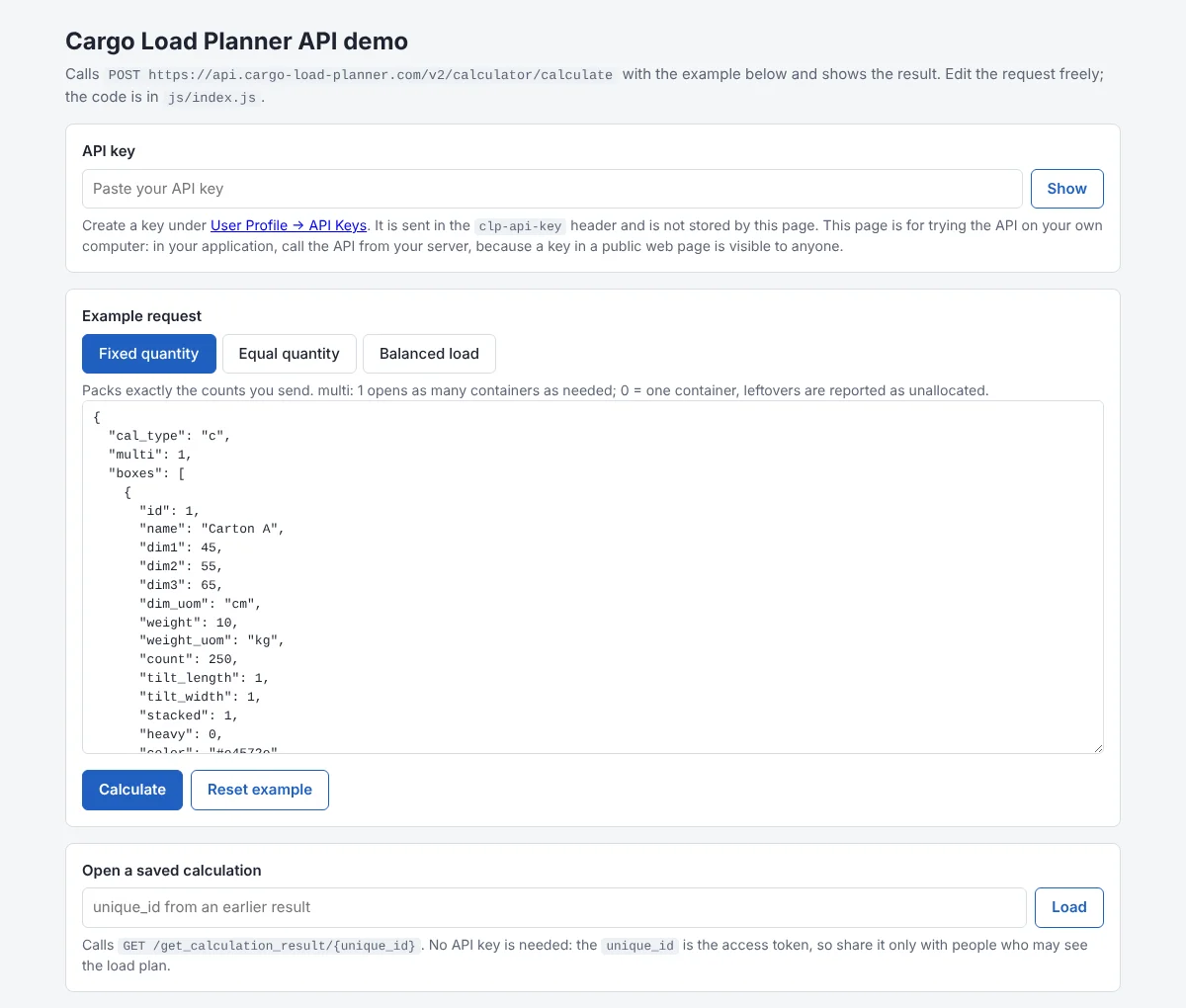
The demo is a small web page that calls the Cargo Load Planner API and shows the result. It
needs no installation: unzip it and open index.html in your browser.
Link: Download
Inside the download:
index.html: the demo pagejs/examples.js: three ready-made requests, with a comment on every fieldjs/index.js: the API calls and how the result is read
Paste your API key, choose an example (Fixed quantity, Equal quantity or Balanced load), edit the request if you like, and select Calculate. The page summarises the result and shows the full response underneath.
https://www.cargo-load-planner.com/api/v1/calculator/container. Switch to
https://api.cargo-load-planner.com/v2/calculator/calculate and give every box its own id.
Make a Request
Send your boxes and your container in one request, with your API key in the
clp-api-key header:
POST https://api.cargo-load-planner.com/v2/calculator/calculate
clp-api-key: YOUR_API_KEY
Content-Type: application/json

{
  "cal_type": "c",
  "multi": 1,
  "boxes": [
    { "id": 1, "name": "Carton A", "dim1": 45, "dim2": 55, "dim3": 65, "dim_uom": "cm",
      "weight": 10, "weight_uom": "kg", "count": 250,
      "tilt_length": 1, "tilt_width": 1, "stacked": 1, "heavy": 0 },
    { "id": 2, "name": "Carton B", "dim1": 75, "dim2": 40, "dim3": 35, "dim_uom": "cm",
      "weight": 12, "weight_uom": "kg", "count": 180,
      "tilt_length": 1, "tilt_width": 1, "stacked": 1, "heavy": 0 }
  ],
  "container": { "name": "Standard 20 feet", "dim_uom": "cm",
                 "x": 235, "y": 239, "z": 590, "volume": 33.2, "weight": 21770 }
}
The same call in JavaScript:
const response = await fetch("https://api.cargo-load-planner.com/v2/calculator/calculate", {
    method: "POST",
    headers: { "clp-api-key": apiKey, "Content-Type": "application/json" },
    body: JSON.stringify(request)
});
const result = await response.json();
The fields you will use most:
| Field | Meaning |
|---|---|
cal_type | c for a container or truck, p for a pallet. |
multi | 1 uses as many containers as needed; 0 fills one container and reports what did not fit. |
quantity_mode | fixed (default) packs the counts you send. equal finds the largest number N so that N of every product fits in one container (2 to 10 products, multi 0, count ignored). |
boxes[].id | Your product id. Every box needs a different id. |
dim1, dim2, dim3 | Width, height and length of one box, in dim_uom: mm, cm, meter, inch, feet or yard. |
weight, weight_uom | Weight of one box, in kg, gm or lb. |
tilt_length, tilt_width | 1 lets the box lie on its side (width up) or stand on end (length up); 0 forbids it. keep_upright: true forbids both. |
stacked, heavy | stacked: 0: nothing may rest on this box. heavy: 1: floor only. |
container | x width, y height, z length (in its dim_uom), volume in m³, weight = maximum payload in kg. Optional clearances fs, bs, ls, rs, ts are always in mm. |
apply_cog | 1 checks and improves the load's centre of gravity; use with placement_policy compact, centred or spread. |
Stacking limits per product (max_load_on_top_kg, max_self_stack,
top_only, bottom_only), delivery stops (group_id),
loading mode and vehicle axle loads are described in the
API documentation. The demo's
Balanced load example uses several of them.
Understand the Result
| Status | Meaning |
|---|---|
200 | The load plan. It is saved, and its unique_id opens it again with
GET https://api.cargo-load-planner.com/v2/calculator/get_calculation_result/{unique_id}
(no API key needed: the unique_id is the access token). |
400 | The request was not accepted. errors names each field and what to fix, for example
"boxes[0].dim_uom": ["Unknown value 'cms'. Use mm, cm, meter, inch, feet, yard."].
A rejected request does not use a calculation from your plan. |
401 | The API key is missing, wrong or expired, or your plan has no calculations left. |
A successful result contains:
options[]: the packing chosen (best_option_id), with itssummary(packed weight and volume, fill percentages) andunallocatedboxes that did not fit.containers[]in that option: every box's position and placed size (items[], withpacksnoas the loading sequence), plus the centre of gravity (cog), the empty spaces (voids) and, when you send a vehicle, the axle loads.equal_quantity: forquantity_mode: "equal", the quantity per product and what limited it.suggestions: changes that would improve the result, each with the fields to add to your request.warnings: notes about the request that did not stop the calculation.
Positions and sizes in the result are in millimetres, box and summary weights in grams, and volumes in cubic millimetres, whatever units you sent.
Link: API Documentation (full list of fields)
Need help?
If you get stuck at any step, our team is happy to help you get connected.