Jump straight to the angle loaders actually use
Four view buttons — 3D (free orbit), From the doors, Side and Top — switch instantly between the angle a planner wants for review and the angle a loader wants for reference while working.
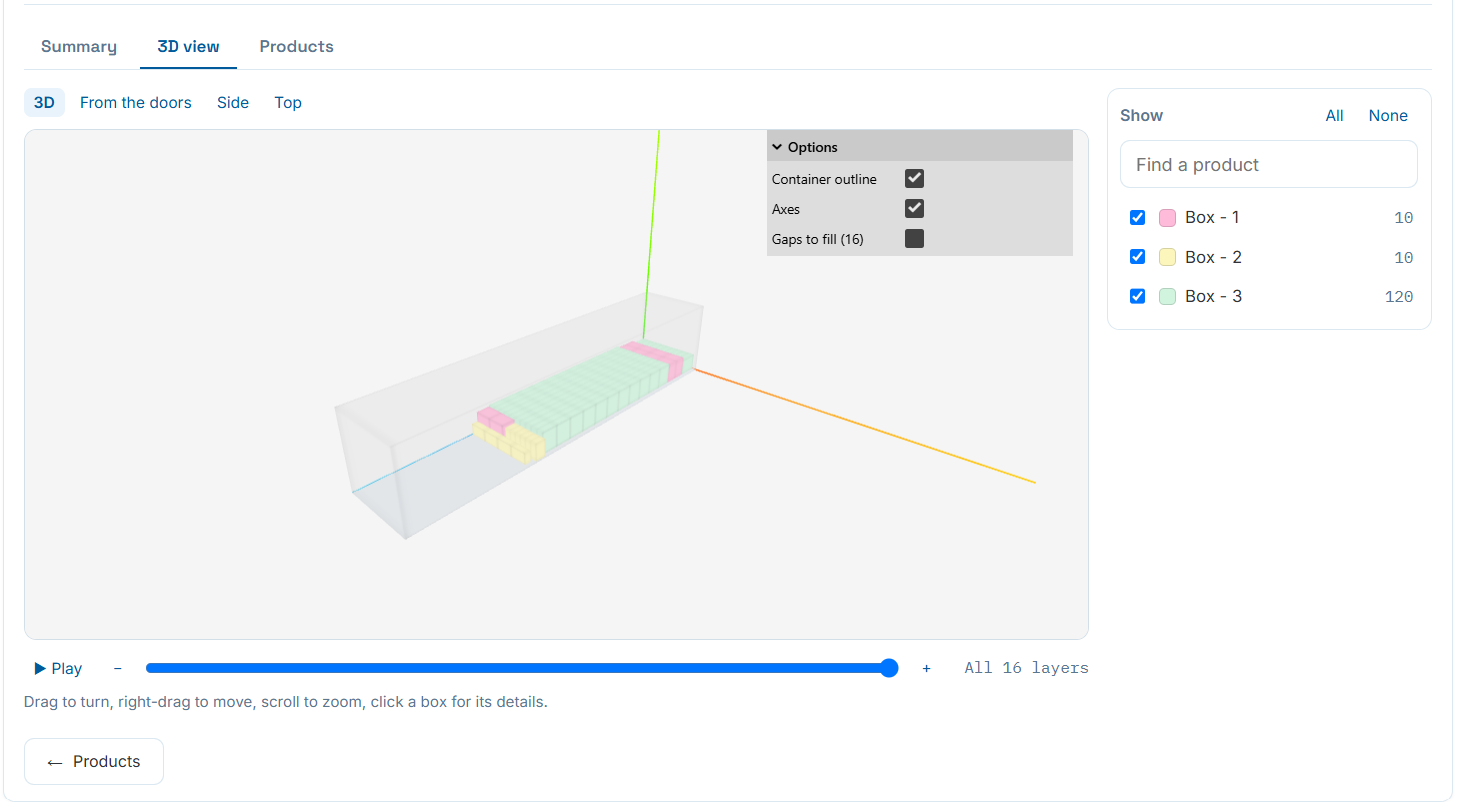
The 3D view tab: camera presets, options, per-product visibility, and layer playback.
Press Play and watch it load, one layer at a time
A slider and Play button step through every layer in the exact order the engine packed it — "All 16 layers" in this example — so a loader on the floor can follow along like a checklist instead of interpreting a static picture.
Isolate any product, or drill into one box
The right-hand panel lists every product with a live piece count and a checkbox — hide everything except the one product you need to check, or use Find a product to jump straight to it. Click any box in the 3D view itself for its details.
Display options let you toggle the container outline, coordinate axes, and a gaps-to-fill overlay so empty pockets are visible right in the 3D scene, not just in a table.
- "Show: All / None" for quickly isolating a single product.
- Container outline and axes toggles for a cleaner or more technical view.
- "Gaps to fill" overlay lines up with the Multi-Stop Deliveries gaps-and-fillers report.
Drag, pan and zoom like any 3D tool
Drag to turn the model, right-drag to move it, and scroll to zoom — the same controls whether you're reviewing at your desk or sharing the link with someone on the warehouse floor.